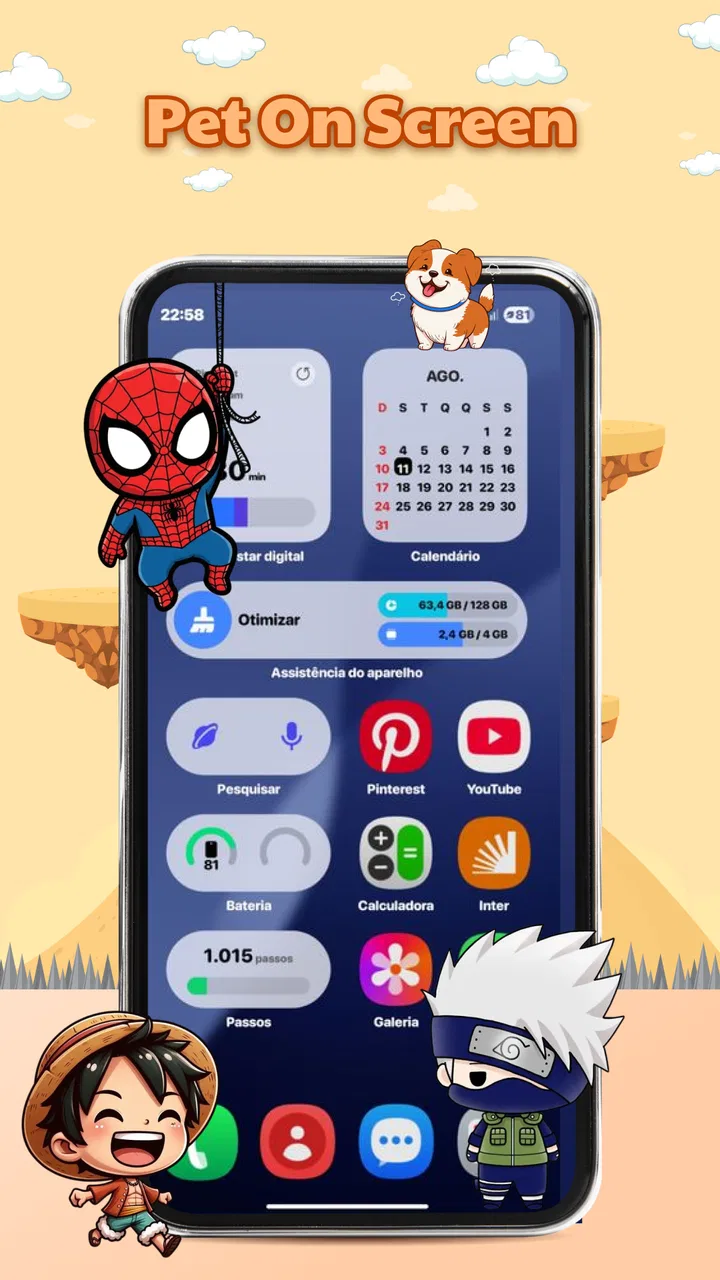
Pet On Screen - Shimeji Kawaii
- 4.5
- Rating
- 1.00M
- Installs
- Free
- Price

 Analysis by App-foxy
I spent time with Pet On Screen - Shimeji Kawaii as a small personalization app rather than treating it like a conventional game. Its appeal is simple: it places cute Shimeji-style pets over the screen, lets me interact with them, and adds a little movement to otherwise static phone use. My overall view is that it works best as a gentle bit of background company, not as a deep virtual-pet simulator or a complete replacement for a themed launcher.
That distinction matters. The app is free, aimed at Everyone, and belongs to the personalization category, but its value is not in changing every part of the phone. It is in creating a more playful screen experience with very little commitment. When I wanted a quick mood lift while checking messages or waiting for another app to load, the animated pet made the phone feel less mechanical. When I wanted a highly organized home screen, detailed customization, or a demanding game, the same simplicity became its main limitation.
How the on-screen pet experience feels in everyday use
The first thing I noticed is how different an on-screen companion feels from an ordinary wallpaper. A wallpaper waits for me to look at it. A Shimeji pet occupies the screen as a small animated presence, so the phone feels more alive even when I am not actively opening a personalization tool. That makes the app especially pleasant during short, repeated phone sessions: checking a notification, pausing between tasks, or opening the device for a few seconds and seeing a cute motion instead of a completely still background.
You May Also Like

 Blood Strike: 2.5 Anniversary
Blood Strike’s Loadouts Turn Every Drop Into a Tactical Gamble
A close look at Blood Strike’s custom loadouts: how fast access to signature weapons reshapes its battle royale rhythm, rewards preparation, and narrows the gap between fights.

 Pandora - Music & Podcasts
Pandora’s Music Is Easy to Start, but Harder to Recover
Pandora’s strength is its low-effort path from a seed to a station. Its weak spot is how much confidence it asks you to place in connection, setup, and quiet recovery.

 8 Ball Pool
 Is Built on Rivalries, Rematches, and Routine
A close look at the rivalries, rematches, shared routines, and unanswered safety questions that turn a quick pool match into a persistent mobile community.

 Samsung Music
’s Quiet Strength Is Playing What You Already Own
Its reach comes less from spectacle than from dependable access to a personal library. That simplicity is both the app’s strongest retention engine and its ceiling.

 AccuWeather: Weather Radar
AccuWeather Review: A Quick, Clear Forecast for Everyday Decisions
For everyday plans, the best forecast is the one you can understand quickly. AccuWeather makes rain timing, radar, and local conditions easy to act on, with a few trade-offs.

 Hill Climb Racing
Why Hill Climb Racing Still Turns Crashes Into One More Run
A tiny car, a bumpy hill and one more upgrade: Hill Climb Racing keeps resurfacing because its simple chaos makes every near-miss feel personal.
More From Our News Desk



The interaction is deliberately light. I can tap or engage with the pet for a moment, watch its motions, and then return to what I was doing. I never felt that I had to learn a complicated system before enjoying it. This is a genuine strength for an app built around relaxation. The experience is closer to keeping a tiny animated mascot nearby than managing a character with a long list of needs.
That simplicity also explains why the app can be appealing to people who do not normally download personalization tools. Many customization apps ask me to redesign icons, replace widgets, build elaborate themes, or spend time arranging several screens. Here, the personality comes from movement and presence. I can get the main effect without turning the home screen into a project.
In practical terms, I found the best use case to be a phone that feels too plain. If my device already has a busy wallpaper, several widgets, and many shortcuts, adding another visual element can make the screen feel crowded. On a simpler layout, the pet has room to stand out. I would therefore start with a clean home screen and judge the result there rather than placing it over an already complicated setup.
A small companion for short breaks
One realistic situation is using the app during a study or work break. I might unlock the phone to set a timer, check a message, or look at a calendar reminder. A small animated pet gives that short pause a softer character without asking me to start a full game. It is not a productivity tool, and I would not pretend it improves concentration by itself, but it can make the transition between tasks feel less sterile.
I also see a place for it on a personal device shared casually with family members. The Everyone age rating makes the concept approachable for a broad audience, and the visual idea is easy to understand without instructions. Younger users may enjoy the pet immediately, while adults can treat it as a low-pressure decorative touch. I would still decide whether a child should use any screen overlay based on the device and household rules, but the app’s basic concept is friendly rather than intimidating.
Another useful approach is to treat the pet as a mood-setting detail instead of a permanent centerpiece. I would turn it on when I want a playful phone, then remove or pause the experience when I need a distraction-free screen. That flexible mindset avoids one of the common problems with animated personalization: something charming at first can become visually tiring when it is always in view.
What makes it more engaging than a static theme
The strongest evidence in its favor is the difference between looking at a design and noticing a character. The motions create tiny moments of surprise, even though the app is not built around a long session. That is why I think the app’s real strength is emotional rather than functional. It gives the interface a sense of company, which ordinary wallpapers and icon packs usually cannot provide.
The interaction also gives the user a reason to return briefly. I do not need to complete a level or maintain a streak. I can simply check the pet, enjoy a motion, and move on. For someone who wants a relaxing digital accessory, that low-pressure loop is more suitable than a feature-heavy virtual-pet app that demands regular care or progress.
There is a useful trade-off here. Because the experience stays lightweight, it does not overwhelm the main purpose of the phone. I can still use the device normally instead of entering a separate game world. On the other hand, people who want a pet with a detailed personality, extensive care mechanics, or a strong sense of progression may find the interaction too shallow. The app’s charm depends on enjoying brief contact rather than expecting a complete simulation.
I also appreciate that the app comes from Tokii Apps with a current version of 1.0.0. That makes the experience feel like an early, focused release rather than a sprawling platform with many unrelated systems. The benefit is clarity: I understand what the app is trying to do. The caution is that an early version may feel less mature to users who expect a large library of options or extensive refinement from a personalization product.
Simple setup, but not a universal fit
The app is free, which lowers the barrier to trying it. I can explore the idea without first deciding whether an elaborate customization purchase is worthwhile. That matters for this type of app because the appeal is personal and visual: some people will immediately enjoy having a pet on screen, while others will find the movement distracting. A free starting point makes that decision easier.
Still, free does not automatically mean frictionless. Any app that places content over the screen needs to fit comfortably into the way I use my phone. I would pay attention to whether the pet feels intrusive during reading, navigation, gaming, or typing. My practical advice is to test it during the activities that matter most to you, not only while browsing the app itself. A cute overlay can be delightful on a quiet home screen and annoying when it competes with controls in another app.
This is also where the app differs from the usual alternatives. A wallpaper is more predictable and rarely interrupts the visual hierarchy of the screen. An icon pack changes the phone’s style more comprehensively but usually requires more setup. A widget offers information or shortcuts, while a full virtual-pet game generally asks for more attention. Pet On Screen sits between these choices: more lively than a wallpaper, less structural than an icon theme, and less demanding than a pet game.
That middle position is its identity, but it can also make the app difficult to justify for users who already know exactly what they want. If the goal is a polished minimalist home screen, I would choose a static wallpaper or carefully selected widgets. If the goal is a character to raise, feed, or develop through a deeper system, I would look toward a dedicated virtual-pet game. This app makes most sense when the desired result is simply a cute animated presence.
Small habits that improve the experience
My first tip is to begin with one pet and a quiet background. The app’s visual effect is easier to judge when there are not several other animated or colorful elements competing with it. This also helps identify whether the motion is soothing or distracting for your personal routine.
My second tip is to use it around transitions rather than during concentration-heavy work. I found the concept better suited to breaks, casual browsing, and relaxed evening use than to reading dense documents or trying to keep a precise train of thought. The pet is designed to add character, so it naturally asks for a small amount of attention.
My third tip is to think of interaction as a short ritual. For example, I might check the pet after finishing a task, tap it once, and then put the phone away. That turns the app into a pleasant boundary between activities instead of another reason to keep scrolling. It is a subtle use, but it fits the app better than expecting it to entertain me continuously.
A fourth consideration is visual balance. If the pet overlaps an important part of the screen, the decorative effect stops being worth it. I would keep the home screen’s main shortcuts clear and avoid placing essential controls where the character is most likely to draw attention. The best result is not maximum animation; it is enough animation to create personality without reducing usability.
Where the meaningful weakness appears
The main weakness is depth. The store concept promises cute pets, interaction, and relaxing motion, and that is exactly the scale of the experience. I would not install it expecting a substantial game, a complete home-screen redesign, or a sophisticated companion with a long-term relationship system. The app gives me atmosphere more convincingly than it gives me progression.
That may sound like a small criticism, but it affects how long the novelty lasts. If I enjoy animated mascots for their own sake, the app can remain a pleasant part of the phone. If I need new goals, unlocks, challenges, or detailed customization to stay interested, I may run out of reasons to open it. Its strongest feature is also its boundary: the app does one small thing rather than trying to become an entire entertainment platform.
There is a second limitation in the nature of screen overlays. The pet is most effective when I can see it, but visibility can become a distraction. Notifications, games, videos, and reading all have their own visual priorities. I would not recommend leaving the companion active in every situation. The better experience comes from choosing when the decoration helps and when a clean screen is more useful.
I would also be cautious about recommending it to anyone who dislikes animated interfaces. Some users prefer their phone to remain quiet and stable, especially when they are working, driving with navigation, or using accessibility settings that require a clear screen. For them, even charming movement may feel like clutter. That is not a failure of the concept; it is a clear sign that the app serves a specific taste.
Who should try it, and who should skip it
I think it is a good match for people who enjoy kawaii design, small decorative details, and casual interaction without a demanding commitment. It should also appeal to users who want their phone to feel more personal but do not want to rebuild the launcher or spend time designing a full theme. The low-pressure format is particularly suitable for someone who wants a quick moment of relaxation rather than another game competing for attention.
The broad age rating supports that approachable character, and the app has already reached over 100 thousand installs with an average rating of 4.5 from around 5.9 thousand ratings. Those figures suggest that the central idea connects with a meaningful audience, although popularity cannot tell me whether the overlay will suit my own habits. I would treat the app’s visual style and level of interaction as more important than its public reception.
I would skip it if my priority is battery-conscious minimalism, a completely unobstructed screen, or a highly structured personalization system. I would also choose another option if I wanted practical information at a glance, because a pet’s purpose is decorative and emotional rather than informational. Likewise, anyone seeking a deep virtual companion should understand that this is a lighter experience.
For families, I would frame it as a shared visual novelty rather than a game with a large amount of content. For adults, it can be a small way to make a familiar device feel warmer. For dedicated Android customizers, it may be best used as an accent alongside a restrained wallpaper rather than as the foundation of a full setup.
Compatibility and the decision to install
The app supports Android 7.0 and later, which makes it accessible to a wide range of Android phones. I would still consider the age and performance of the individual device when deciding how prominently to use an animated screen companion. On an older phone, keeping the interface simple is generally the sensible approach, even when an app itself is designed to be approachable.
Because this is a personalization app rather than a replacement for the phone’s main software, I would not expect it to transform the entire device. Its role is narrower and easier to understand: add a character, interact for a moment, and enjoy the visual change. That clarity is helpful when deciding whether it belongs in my daily setup. I can try it without committing to a new launcher style or a long-running game routine.
The most important question is therefore not whether the app contains enough content for everyone. It is whether I want an animated pet to share the screen with me. If the answer is yes, the free price and simple premise make experimentation easy. If the answer is no, no amount of extra setup will turn a moving mascot into a useful tool that I actually need.
After using it, I see Pet On Screen - Shimeji Kawaii as a focused personalization choice with a clear emotional payoff. Its cute motions and light interaction can make ordinary phone moments more enjoyable, especially when used selectively and on an uncluttered screen. The trade-off is equally clear: it offers charm rather than depth, and the overlay can become distracting for people who prefer a calm, highly functional interface.
My recommendation is straightforward. Try it if you want a friendly animated detail, enjoy kawaii aesthetics, and prefer a companion that does not demand a serious time investment. Skip it if you need deep pet simulation, practical widgets, or a perfectly static screen. For the right user, the best feature is its restraint: it adds personality without asking the phone to become a different kind of device.
FAQs for Pet On Screen - Shimeji Kawaii
01What is Pet On Screen - Shimeji Kawaii?
Pet On Screen - Shimeji Kawaii is an interactive and customizable app that allows you to have cute animated pets roam around your mobile screen. These virtual companions add a touch of charm and fun to your daily device interaction. They can walk, sleep, and even interact with your screen elements.
02How do I customize my Shimeji pet?
Customizing your Shimeji pet is easy and fun. Once you open the app, you can choose from a wide variety of characters, change their appearance, and even select different animations. Additionally, you can adjust their behavior and interactions to suit your personal preferences, making your pet unique.
03Will having Shimeji pets affect my phone’s performance?
Shimeji pets are designed to be lightweight and should not significantly impact your phone’s performance. However, if you notice any lag or battery drain, it may be due to multiple apps running simultaneously. Adjusting the number of active pets or animations can help optimize performance.
04Is Pet On Screen - Shimeji Kawaii free to use?
The app is available as a free download, offering basic features and a selection of pets at no cost. However, additional characters, customization options, and premium features may require in-app purchases. Check the app's store page for specific pricing details and available packages.
05Can I use Shimeji pets on any type of smartphone?
Pet On Screen - Shimeji Kawaii is compatible with most Android and iOS devices. However, it’s important to check the app's requirements in the app store to ensure compatibility with your specific device model and operating system version. This will ensure the best experience with your virtual pets.
Pros
- Cute animations enhance device aesthetics.
- Customizable pet characters add personality.
- Low battery consumption during use.
- Easy installation and user-friendly interface.
- Regular updates with new pet options.
Cons
- Limited pet interaction features available.
- Ads can be intrusive at times.
- Some pets require in-app purchases.
- May slow down older devices slightly.
- Needs internet for full functionality.

Pet On Screen - Shimeji Kawaii
Gallery